Key Findings:
- AI social creative generators fall into three camps: AI-native design platforms, traditional design tools with AI bolted on, and ad-focused AI tools for paid campaigns.
- Iconly leads for teams wanting one platform that generates on-brand social graphics across every format, with custom icons and AI copywriting built in.
- Canva Magic Studio is the best option for teams already inside the Canva ecosystem.
- AdCreative.ai is the strongest dedicated paid-ad generator, with CTR-optimized layouts and A/B variants.
- Brand consistency and multi-format output - not raw image quality - are what separate the leaders in 2026.
Social media is the highest-volume design channel most teams touch - dozens of creatives per week, across multiple formats, all of which need to look on-brand. AI has collapsed that workload dramatically. Our AI social media graphics guide covers the fundamentals for small businesses.
But with dozens of AI social tools launching in 2026, choosing the right one depends less on "can it make a pretty image" and more on "can it generate on-brand creatives across every format, with my icons, my copy, and editable layouts I can refine without rerolling the prompt." Here's our comprehensive comparison.
What Makes a Great AI Social Creative Generator?
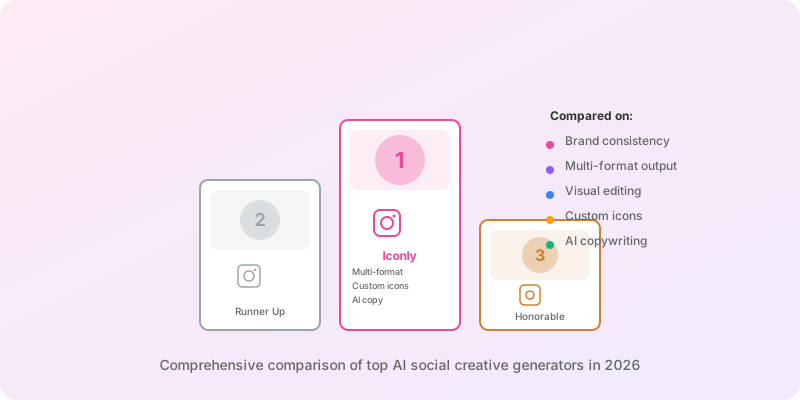
Before diving into specific tools, here's what separates a production-ready AI social generator from a single-image toy:
Brand Consistency
Does it apply your colors, fonts, and icons automatically?
Multi-Format Output
Facebook, Instagram, Story, Square - generated in one pass?
Visual Editing
Click-and-drag refinement after generation - not just re-prompting?
AI Copywriting
Headlines, CTAs, and body copy generated alongside the visual?
1. Iconly - Best for On-Brand Social Creatives With Custom Icons
Iconly
AI social graphics with custom icons and brand profiles
Iconly's Social Graphics Studio is purpose-built for on-brand social creatives. Unlike generic AI image tools or template-first editors, Iconly combines AI layout generation, AI copywriting, and a full visual editor - with your custom icons and saved brand profile applied to every output.
Key Strengths
- Multi-Format Presets - Facebook (1200x628), Instagram (1080x1080), Story (1080x1920), Square, Portrait, Landscape, Wide, and Standard
- Multi-Format Generation - Facebook and Instagram platforms generate three sizes in one pass
- Multiple Copies - Generate 1-3 independent creative variations for the same prompt in parallel
- Brand Profiles - Brand Studio stores colors, fonts, logo, products, and identity; applied automatically
- Custom Icon Attachment - Attach icons from your library; the AI places them where they fit the design
- AI Copywriting - Headlines, subheads, and CTAs generated alongside the visual
- Full Visual Editor - Click-and-drag, typography, spacing, shadows, borders, and multi-select
- Refine Layout Pass - Screenshots the output and sends it back to the AI to fix text overlaps and sizing
- Image Refinement API - Pixel-level cleanup of text alignment and centering
Best For
Marketing teams, founders, and agencies that want on-brand social creatives without hiring a designer or bouncing between tools. Because Iconly bundles icon generation, social graphics, brand profiles, and email templates, one subscription covers the entire campaign pipeline.
2. Canva Magic Studio - Best for Template-First Design
Canva Magic Studio
AI features layered on Canva's template editor
Canva Magic Studio is a collection of AI tools layered on top of Canva's massive template library - Magic Design, Magic Write, Magic Edit, Magic Switch, and Magic Expand. For teams already on Canva, it's a natural way to speed up template selection and copywriting.
Key Strengths
- Template Library - Hundreds of thousands of pre-built templates across every social format
- Magic Switch - Resize a design into all social formats in one click
- Brand Kit - Store logos, colors, and fonts for reuse
- Ecosystem - Presentations, video, print, and docs in one suite
Limitations
- AI is additive to the template workflow, not a first-class "generate from scratch" experience
- Custom icon generation isn't built in - you're limited to Canva's stock library
- Magic Design output can feel templated rather than tailored
- Pro pricing adds up across a team
Best For
Teams already invested in Canva who want AI speed-ups inside a familiar template-first workflow, and don't need custom icon generation or true from-scratch AI layout.
3. AdCreative.ai - Best for Paid Ad Creatives
AdCreative.ai
CTR-optimized AI ad generator
AdCreative.ai is a dedicated AI ad creative generator trained on performance data. It outputs a stack of on-brand static ad variants sized for Meta, Google, and LinkedIn, and scores each variant on predicted CTR.
Key Strengths
- Performance-Driven Output - Variants scored on predicted CTR
- Ad Platform Presets - Meta, Google, LinkedIn, TikTok ad sizes in one pass
- A/B Variants - Generates multiple variations optimized for split-testing
- Brand Kit - Colors, logos, and fonts applied to every generation
Limitations
- Narrow focus on paid ads - weaker for organic social and story content
- Layouts can feel formulaic after repeated use
- Pricing scales quickly with volume
- Limited visual editing compared to design-first tools
Best For
Performance marketers and ecommerce brands running paid ads at volume, where CTR lift matters more than creative originality.
4. Adobe Express (Firefly) - Best for Adobe Ecosystem Users
Adobe Express
Adobe's AI design tool powered by Firefly
Adobe Express combines Adobe Firefly's generative image model with a template-based design tool. It integrates with Creative Cloud so assets flow between Photoshop, Illustrator, and Express.
Key Strengths
- Firefly Model - Commercially safe AI images trained on licensed content
- Creative Cloud Integration - Assets sync with Photoshop, Illustrator, and Lightroom
- Template Library - Large library across social, print, and marketing formats
- Brand Assets - Centralized brand kits inside Creative Cloud
Limitations
- Interface is more complex than pure AI-first tools
- Best features require a Creative Cloud subscription
- Not optimized for multi-variant ad generation
- Firefly outputs still need significant post-editing for on-brand social work
Best For
Teams already on Adobe Creative Cloud who want AI generation inside their existing asset pipeline.
5. Predis.ai - Best for Organic Social Scheduling
Predis.ai
AI social content with built-in scheduling
Predis.ai combines AI creative generation with captions, hashtags, and built-in post scheduling across platforms. It's aimed at solo creators and small teams running organic social.
Key Strengths
- Captions + Hashtags - AI generates full post copy tuned to each platform
- Carousel Support - Multi-slide Instagram carousels in one generation
- Built-in Scheduling - Queue and auto-post to connected social accounts
- Competitor Analysis - AI-driven insights on competitor content
Limitations
- Creative quality is solid but less refined than Iconly or Canva
- Brand system is basic compared to dedicated brand studios
- Best for organic - weaker for high-volume paid ad workflows
- No custom icon generation pipeline
Best For
Solo creators, coaches, and small businesses running organic social who want generation, captioning, and scheduling in one tool.
Feature Comparison
| Feature | Iconly | Canva | AdCreative.ai | Adobe Express | Predis.ai |
|---|---|---|---|---|---|
| Brand Profile System | Yes | Yes | Yes | Yes | Basic |
| Auto-Crawl Brand | Yes | No | Limited | No | Limited |
| Custom Icon Generation | Yes | No | No | No | No |
| Multi-Format in One Pass | Yes | Yes | Yes | Limited | Limited |
| AI Copywriting | Yes | Magic Write | Yes | Yes | Yes |
| Visual Edit Mode | Yes | Yes | Limited | Yes | Limited |
| CTR-Scored Variants | No | No | Yes | No | No |
| Built-in Scheduling | No | Yes | No | Limited | Yes |
| Email + Icons Bundled | Yes | No | No | No | No |
| Free Tier | Yes | Yes | Trial only | Yes | Trial only |
Which Tool Should You Choose?
Iconly
On-brand social creatives with custom icons and AI copywriting. Best for teams wanting one tool for icons, social, and email.
Canva Magic Studio
Template-first teams wanting AI speed-ups inside a familiar editor and ecosystem.
AdCreative.ai
Performance marketers running paid ads at volume, where CTR lift matters more than visual originality.
Adobe Express
Teams already on Creative Cloud who want Firefly generation in their asset pipeline.
The Bottom Line
For most teams, the winning AI social creative generator isn't the one with the most impressive image model - it's the one that produces on-brand creatives across every format, with your icons, your copy, and a real editor you can use to fix the output.
Template-first tools like Canva are convenient for teams that want familiar drag-and-drop plus AI speed-ups. Performance-ad tools like AdCreative.ai are strong for paid media at volume, while Adobe Express suits teams inside the Creative Cloud ecosystem and Predis.ai targets solo creators running organic social. But if you want one platform that generates icons, on-brand social creatives, and HTML emails from the same brand profile, a bundled AI design platform wins on cost and consistency.
Our recommendation: Start with Iconly's Social Graphics Studio for on-brand creatives with custom icons and a full editor. Layer on a scheduler or ad platform only if your workflow genuinely needs it.
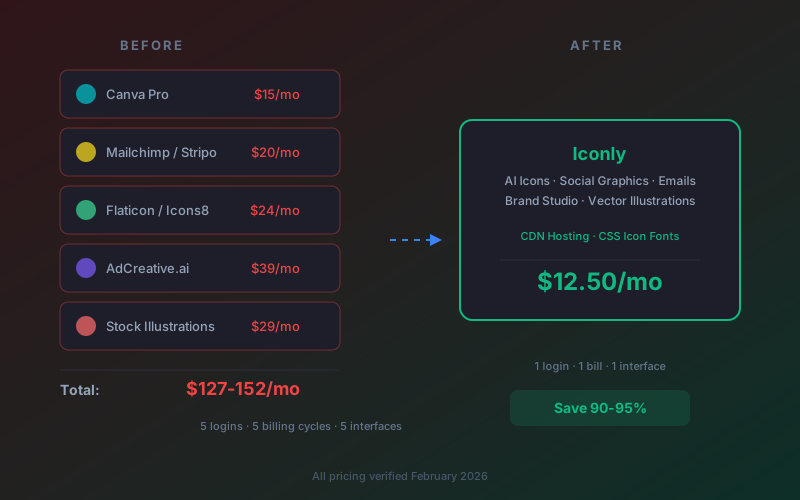
Want to learn more? Read our AI social media graphics guide for small businesses, our guide to turning icons into ad creatives, and our guide to replacing design subscriptions with one AI platform. If email is also part of your campaign, see our best AI email generators comparison.
Ready to try it? Create a free account and get 300 free tokens. Explore all features or view pricing plans.
Frequently Asked Questions
What is the best AI social media creative generator in 2026?
Iconly is the best AI social media creative generator in 2026 for teams that want on-brand graphics with custom icons, AI copywriting, and full visual editing in one tool. It generates graphics across Facebook, Instagram, Story, Square, Portrait, Landscape, and Wide formats, applies a saved brand profile automatically, and includes a full click-and-drag editor with typography, spacing, shadows, and border controls. Canva's Magic Studio is a strong alternative for teams already using Canva, and AdCreative.ai is best for paid-ad-heavy workflows.
Can AI generate on-brand social media graphics?
Yes - AI tools with a brand profile system, like Iconly's Brand Studio, apply your brand colors, fonts, and icon style to every generation automatically. Iconly can even auto-crawl a website URL to extract brand identity into a reusable profile. Generic AI image tools produce pretty pictures but rarely on-brand graphics, and Canva's AI still requires manual template selection to stay on-brand.
Which AI tools support multiple social media formats?
Iconly supports Facebook (1200x628), Instagram (1080x1080), Story (1080x1920), Square, Portrait, Landscape, Wide, and Standard formats in one generation flow, and multi-format platforms like Facebook and Instagram produce three sizes at once. Canva supports virtually every social format through templates. AdCreative.ai and Predis.ai both support the major platforms through platform-specific presets.
Do AI social media tools include copywriting?
Yes. Iconly generates ad copy and text suggestions alongside the visual in one pass - the AI decides what text to place, where, and in what hierarchy. AdCreative.ai is heavily focused on ad copy and CTA optimization for paid campaigns. Canva's Magic Write is a separate copywriting tool you invoke manually inside the editor. Predis.ai generates captions and hashtags tuned for organic social.
What should I look for in an AI social media creative generator?
The most important features are brand consistency (a saved brand profile with colors, fonts, and icon style), custom icon and asset support so you're not forced to use stock imagery, visual editing to fix layout issues after generation, multi-format output for Facebook, Instagram, and Story in one generation, and AI copywriting built into the flow. Purpose-built AI design tools outperform general-purpose image generators for social work because they handle text placement, hierarchy, and brand application rather than just producing a picture.