Key takeaway: An AI image generator is useful when you need one visual. An AI design agent is useful when you need a workflow: brand context, custom icons, social graphics, email templates, saved assets, and human review all connected in one sequence.
AI image generators changed how fast teams can create visuals. You can describe a concept, pick a style, and get a draft image in seconds. For single assets, that is still powerful.
But most design work is not a single asset. A product launch might need custom icons, a social post, a story graphic, a responsive email template, a reusable brand profile, and a few saved media assets for follow-up campaigns. That is where a normal image generator starts to feel too narrow.
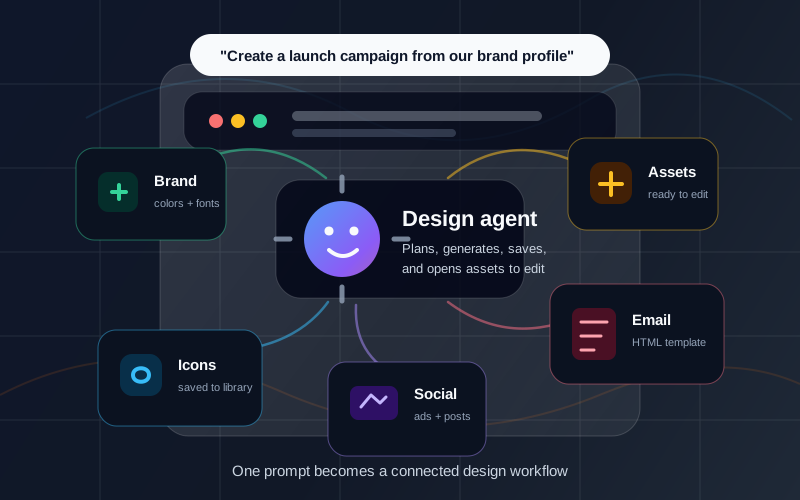
An AI design agent solves a different problem. It does not just generate one image. It coordinates the steps between tools. It can use brand context, generate assets, save the useful ones, pass them into other creative formats, and open the results for final editing.
This article explains the practical difference: when to use an AI image generator, when to use an AI design agent, and why connected workflows matter for teams building production-ready design assets.
Quick Answer
The difference is simple:
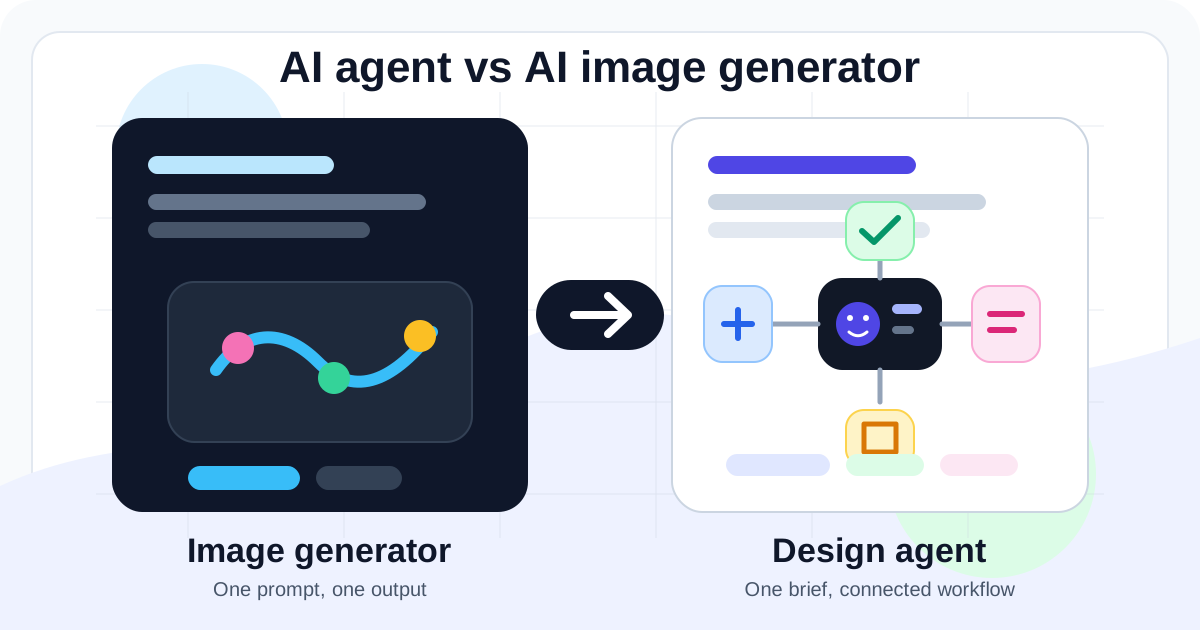
- An AI image generator turns a prompt into an image.
- An AI design agent turns a brief into a sequence of design actions.
If you ask for "a neon rocket icon," a generator can make the image. If you ask for "a launch campaign with three matching icons, two social graphics, and a branded announcement email," you need a workflow. That is the agent's job.
In Iconly, the AI design agent can work across the same toolkit as the app: AI icon generation, social creative generation, HTML email templates, Brand Studio, the asset library, and editor handoff.
Definitions
What Is an AI Image Generator?
An AI image generator creates a visual from a text prompt or reference image. The output is usually a raster image such as PNG, JPEG, or WebP, though some tools also create SVG or other formats.
Image generators are best for contained creative tasks:
- Generating one concept image.
- Creating one icon or illustration draft.
- Exploring visual directions.
- Producing a background, product mockup, or decorative image.
- Creating variations from a reference.
The limitation is not quality. The limitation is scope. A generator can make an output, but it usually does not know what should happen before or after that output.
What Is an AI Design Agent?
An AI design agent is a chat-based assistant that can plan and execute a design workflow. It can decide which tools are needed, call those tools, keep track of generated assets, and hand the results to the right place for review.
In Iconly, this means the agent can help with tasks such as:
- Checking available tokens before generation.
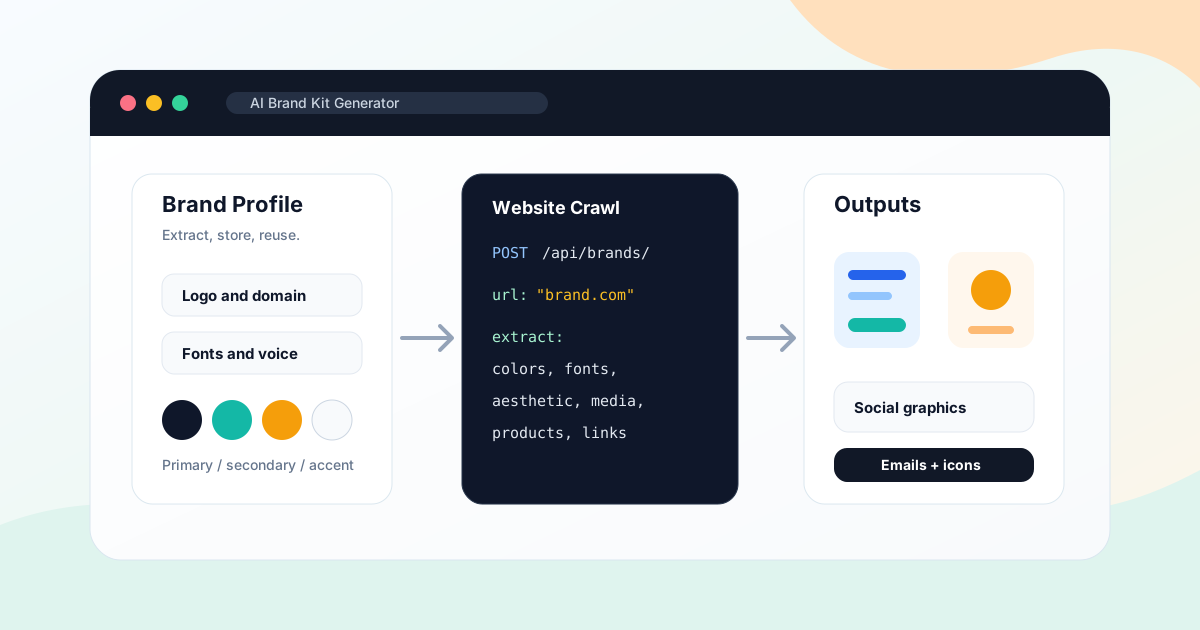
- Finding or creating a brand profile.
- Generating a matching icon set.
- Saving strong icons to the library.
- Using saved icons inside social creatives.
- Generating responsive HTML email templates.
- Opening drafts in the visual editor for final polish.
That makes the agent less like a single generator and more like a workflow layer over the Iconly design platform.
The Main Differences
Output Scope
Image generators create one visual output. Design agents can create several connected assets.
Context
Image prompts often repeat context. Agents can reuse a brand profile, library assets, and campaign brief.
Handoff
A generator returns a file. An agent can save, reuse, and open outputs in the right editor.
Workflow Memory
Agents can keep track of previous steps, such as which icon was saved and which brand should apply next.
Think of it this way: an image generator is a creative engine. A design agent is a creative operator. The engine can produce output; the operator knows how to move that output through a larger system.
Workflow Example: One Launch Brief
Imagine you are launching a new analytics feature for a SaaS product. You need three matching feature icons, an Instagram square post, a story graphic, and a launch email.
With a normal image generator, you might work like this:
- Prompt for the first icon.
- Prompt for two more icons and try to keep the style consistent.
- Download the icons.
- Open a separate design tool for the social post.
- Manually upload the icons.
- Write the social copy.
- Open an email builder.
- Rebuild the same message and visual system again.
With an AI design agent, the workflow can be planned as one connected request:
"Use our saved brand profile to create a launch campaign for the new analytics dashboard. Generate three matching icons, save them to the library, create a square social post and story graphic, then build a responsive announcement email using the same message and icons."
The agent can split that request into steps: use the brand profile, generate the icons, save the best results, create the social graphics, build the email, and open drafts for review. You still approve the work, but you do less manual stitching.
For a more detailed campaign walkthrough, read AI Campaign Generator: Create Launch Assets From One Brief.
When to Use an AI Image Generator
Use an image generator when the job is narrow and the output does not need much workflow coordination.
Good use cases include:
- Single concept visuals. You need one illustration, one background, or one mood-board asset.
- Fast exploration. You want to compare visual directions before committing to a style.
- One-off icon drafts. You need an individual icon and do not need a full system.
- Reference generation. You want an image that will guide another design process.
Iconly includes focused generators for these jobs, including the icon generator and vector generator. If you already know the exact asset you need, starting directly in the generator can be faster than asking an agent to plan the workflow.
When to Use an AI Design Agent
Use a design agent when the task has multiple steps, multiple assets, or a need for consistency across outputs.
Strong use cases include:
- Campaign creation. Generate icons, social graphics, and emails from one brief.
- Brand consistency. Reuse saved brand colors, fonts, products, and aesthetic details across assets.
- Asset systems. Create icons and save them to the library for later reuse.
- Developer workflows. Use API-backed design generation with predictable steps and handoff.
- Multi-format output. Create square, story, landscape, email, and reusable media assets from one campaign idea.
The agent is especially useful for teams that want the speed of AI without turning every campaign into a messy folder of disconnected files.
AI Design Agent vs AI Image Generator Comparison
| Criteria | AI Image Generator | AI Design Agent |
|---|---|---|
| Primary job | Create one visual from a prompt. | Plan and execute a design workflow. |
| Best for | Single images, concept art, one-off graphics, quick exploration. | Campaigns, brand systems, multi-asset production, repeatable workflows. |
| Context handling | Usually depends on prompt details entered each time. | Can reuse brand profiles, saved assets, previous steps, and workflow instructions. |
| Asset reuse | Often manual: download, upload, organize, and place elsewhere. | Can save useful outputs to the library and reuse them in later steps. |
| Output types | Usually image files. | Can coordinate icons, SVG vectors, social creatives, HTML emails, brand profiles, and library assets. |
| Human role | Prompt, download, edit, and assemble manually. | Approve the plan, review outputs, refine drafts, and make final decisions. |
Comparison Keywords and Search Intent
Searches around AI agent vs AI image generator are usually education searches. The reader has seen both categories and wants to understand whether an agent is just a fancier prompt box or a different kind of tool. Related searches include AI design agent vs image generator, agentic AI design tool, AI workflow generator, AI creative automation, and AI campaign asset generator.
The useful answer is not that one category is always better. The useful answer is that they serve different jobs. Image generators are best for single visual outputs. AI design agents are best for multi-step creative workflows where the assets need to share brand context, message, style, and destination.
| Keyword | Best Answer | Internal Next Step |
|---|---|---|
| AI image generator | Use it when you need one image, icon, or concept visual. | AI Icon Generator |
| AI design agent | Use it when the work spans tools, assets, and review steps. | Iconly Agent |
| AI creative automation | Use an agent or API workflow to repeat brand-aware asset production. | Iconly API |
| AI campaign asset generator | Use a workflow that creates icons, social graphics, emails, and reusable assets together. | AI Campaign Generator |
This comparison is especially useful for searchers deciding between general-purpose AI image tools and a workflow-first AI design platform. If the deliverable is a single visual, a generator is enough. If the deliverable is a campaign system or brand asset workflow, an agent is the better fit.
Where Human Review Still Fits
AI design agents reduce repetitive work, but they do not remove judgment. The final review still matters, especially for customer-facing assets.
Before publishing, check:
- Message accuracy: offers, feature claims, dates, and CTAs.
- Brand fit: colors, fonts, tone, icon style, and visual hierarchy.
- Accessibility: contrast, text size, alt text, and icon meaning.
- Platform fit: social dimensions, safe zones, email width, and export format.
- Production quality: cropping, spacing, alignment, and final polish.
The best mental model is not "agent replaces designer." It is "agent handles the setup, sequencing, and first draft so the human can spend more time on judgment."
Bottom Line
If you need one image, use an AI image generator. If you need a connected design workflow, use an AI design agent.
For Iconly users, that distinction maps directly to the product. The individual generators are great when you know the asset you need: icons, vectors, social graphics, or emails. The Iconly Agent is better when the request spans tools: create a campaign, reuse a brand, save icons, generate social assets, build an email, and hand everything off for review.
That is the real difference. Image generation is about output. Agentic design is about getting from a brief to a usable system of assets.
Frequently Asked Questions
What is the difference between an AI design agent and an AI image generator?
An AI image generator creates a visual from a prompt. An AI design agent plans and executes a workflow across multiple design tools. In Iconly, that can include brand profiles, icon generation, library saves, social creatives, HTML email templates, token checks, and editor handoff.
When should I use an AI image generator?
Use an AI image generator when you need one contained visual output. Good examples include a single icon, one illustration, a background image, a concept visual, or a quick style exploration.
When should I use an AI design agent?
Use an AI design agent when the request spans multiple assets or steps. It is strongest for campaign workflows, brand-consistent asset sets, reusable icon libraries, social and email campaigns, and tasks where outputs need to connect.
Can an AI design agent replace a designer?
Not completely. An AI design agent can speed up planning, generation, and asset handoff, but human review is still important for strategy, taste, copy accuracy, accessibility, and final production quality.
What can the Iconly agent create?
The Iconly agent can help create icons, SVG vectors, social creatives, and responsive HTML email templates. It can also work with brand profiles, library assets, token checks, and editor handoff using the same core product systems as the Iconly app.
Continue reading: Iconly API: Complete Guide to Icons, Social Graphics, Emails, and Vectors · Iconly Agent Skills: How AI Assistants Can Use the Design API · AI Ad Copy and Design Generator: Create Visuals and Copy Together · AI Campaign Generator: Create Marketing Campaign Assets From One Brief · How to Keep Social Graphics and Emails On-Brand With AI