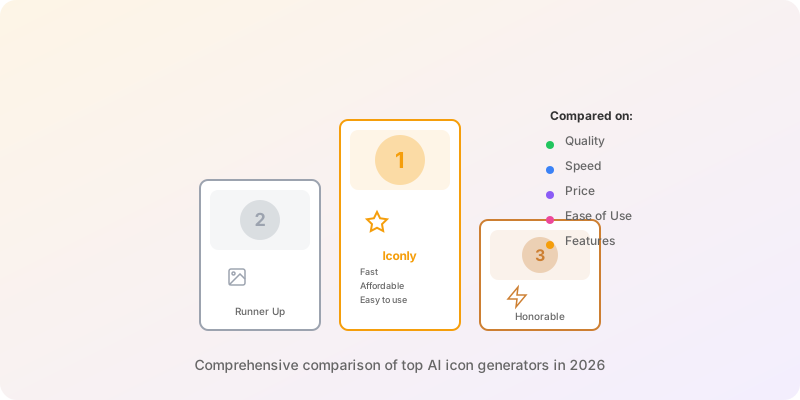
Key Findings:
- Specialized AI icon generators significantly outperform general-purpose image generators for production icon work.
- Iconly leads the field with built-in editing tools, style presets, custom templates, and CDN delivery.
- Midjourney excels at artistic and illustrative icon styles but requires heavy post-processing for UI use.
- Recraft is the only tool offering native vector (SVG) output, making it ideal for designers working in Illustrator or Figma.
- DALL-E 3 is being deprecated in May 2026, so teams should plan accordingly.
The landscape of icon design has been transformed by AI. What once required hours of skilled design work can now be accomplished in seconds. If you're new to AI icon generation, our complete guide covers the fundamentals. But with so many AI icon generators emerging, choosing the right tool for your workflow can be overwhelming.
We've tested the leading AI icon generators to help you find the best fit for your projects. Here's our comprehensive comparison for 2026.
What Makes a Great AI Icon Generator?
Before diving into specific tools, let's establish what separates good AI icon generators from great ones:
Style Consistency
Can it generate cohesive icon sets, not just one-offs?
Customization
How much control do you have over the output?
Export Quality
Production-ready files (PNG, SVG) with transparency?
Speed
How quickly can you iterate on designs?
1. Iconly - Best for Production-Ready Icons
Iconly
Purpose-built AI icon generator
Iconly is purpose-built for icon generation, which shows in every aspect of the tool. Unlike general-purpose image generators, Iconly understands that icons need to be clean, consistent, and immediately usable.
Key Strengths
- Multiple Style Presets - Line, glyph, outline, flat, and more built-in styles
- Post-Processing Tools - Recolor, adjust thickness, smooth edges, and crop in the editor
- Custom Templates - Save your own style presets with automatic post-processing
- CDN Delivery - Get instant CDN links for your generated icons
- REST API - Full API access for programmatic icon generation and management
- Transparent Backgrounds - Icons export ready to use, no background removal needed
Best For
Teams needing consistent icon sets for apps, websites, or design systems. The built-in editing tools mean you can go from prompt to production without switching applications. Whether you need UI icons, social media graphics, or brand assets, Iconly covers the full workflow.
2. Midjourney - Best for Artistic Icons

Midjourney
Artistic AI image generation
Midjourney excels at creating visually stunning, artistic imagery. While not specifically designed for icons, it can produce unique, illustrative icon styles that stand out.
Key Strengths
- Artistic Quality - Exceptional at stylized, illustrative outputs
- Creative Variations - Great for exploring unusual visual directions
- Active Community - Large community sharing prompts and techniques
Limitations
- Not optimized for clean, minimal icons
- Outputs require significant post-processing
- No built-in background removal or icon-specific tools
- Consistency across sets is challenging
Best For
Creative projects where artistic expression matters more than UI consistency. Think game assets, marketing materials, or standalone illustrations.
3. DALL-E 3 (OpenAI) - Best General-Purpose Option

DALL-E 3
OpenAI's image generation model
OpenAI's DALL-E 3 offers impressive prompt understanding and can generate decent icons when given specific instructions. Its integration with ChatGPT makes iteration conversational.
Note: OpenAI has announced DALL-E 3 will be deprecated in May 2026, replaced by GPT Image capabilities.
Key Strengths
- Prompt Understanding - Excellent at interpreting complex requests
- ChatGPT Integration - Natural language refinement of outputs
- Accessibility - Available through ChatGPT Plus subscription
Limitations
- Icons often have unnecessary detail or backgrounds
- Limited style control compared to specialized tools
- No dedicated icon export or editing features
- Being phased out in favor of newer models
Best For
Quick prototyping or when you need occasional icons alongside other AI image tasks.
4. Recraft - Best for Vector Output

Recraft
AI design tool with vector output
Recraft positions itself as an AI tool for designers, with native vector output being its standout feature. Their dedicated icon generator creates sets of 6 icons at once.
Key Strengths
- Vector Output - Generates SVG files directly
- Batch Generation - Create 6 icons in matching style with one click
- Style Controls - Good range of preset styles and color options
- Design-Focused - UI built for design workflows
Limitations
- Vector quality can be inconsistent
- Smaller user base means fewer community resources
- Less intuitive for non-designers
Best For
Designers who specifically need vector output and are comfortable refining results in tools like Illustrator or Figma.
5. IconifyAI - Budget-Friendly Alternative

IconifyAI
Simple app icon generator
IconifyAI offers a straightforward approach to AI icon generation at accessible price points, focused primarily on app icons.
Key Strengths
- Simple Interface - Easy to use, minimal learning curve
- App Icon Focus - Optimized for 1024x1024 app store icons
- Credit-Based Pricing - Pay only for what you use
- Quick Results - Fast generation times
Limitations
- Fewer style options than competitors
- Limited editing capabilities
- Less consistent quality for UI icons
- No CDN or integration features
Best For
Individual creators or hobbyists who need app icons without a significant investment.
Feature Comparison
| Feature | Iconly | Midjourney | DALL-E 3 | Recraft | IconifyAI |
|---|---|---|---|---|---|
| Icon-Specific | Yes | No | No | Partial | Yes |
| Style Presets | 6+ | None | None | Several | Limited |
| Built-in Editing | Yes | No | No | Limited | No |
| Transparent Export | Yes | No | No | Yes | Yes |
| Custom Templates | Yes | No | No | No | No |
| CDN Delivery | Yes | No | No | No | No |
| REST API | Yes | No | No | No | No |
| Vector Output | No | No | No | Yes | No |
| Free Tier | Yes | No | No | Yes | No |
Which Tool Should You Choose?
Iconly
Production-ready icons, built-in editing, CDN delivery. Best for product teams.
Midjourney
Artistic, illustrative icons. Best for games, marketing, or creative projects.
DALL-E 3
Quick prototypes alongside other AI tasks. Note: being deprecated May 2026.
Recraft
Vector output essential. For designers using Illustrator or Figma.
The Bottom Line
For most icon generation needs, specialized tools outperform general-purpose AI image generators. The difference is in the details: transparent backgrounds, consistent styling, and editing tools that understand what makes icons work.
While general-purpose tools like Midjourney and DALL-E can create impressive imagery, they weren't built with icons in mind. The extra steps required to make their outputs usable add up quickly when you're building an icon set. For a broader look at what's available across all AI tool categories, ToolPilot.ai maintains a comprehensive directory of AI-powered design and productivity platforms.
Our recommendation: Start with a specialized tool like Iconly for production work, and reserve general-purpose generators for creative exploration or one-off artistic pieces.
Want to master the craft? Read our complete guide to AI icon generation for prompting tips, best practices, and workflow advice. You can also learn about using icons in email marketing.
Ready to try it yourself? Create a free account and get 300 free tokens to generate your first icons. Explore all features or view pricing plans.
Frequently Asked Questions
What is the best AI icon generator in 2026?
Iconly is the best AI icon generator for production-ready icons in 2026. It is purpose-built for icon generation with built-in style presets, post-processing tools like recoloring and thickness adjustment, custom templates for consistent sets, CDN delivery for instant web deployment, and transparent background export. For artistic or illustrative icons, Midjourney is a strong alternative, while Recraft is best when native vector SVG output is required.
Can AI generate consistent icon sets?
Yes, specialized AI icon generators like Iconly can produce consistent icon sets using built-in style presets and custom templates. The workflow involves generating a reference icon, perfecting it with editing tools, saving your style settings as a template, and then applying that template across all subsequent generations. General-purpose image generators like Midjourney and DALL-E lack icon-specific controls, making set consistency much more difficult to achieve.
Are there free AI icon generators?
Yes, several AI icon generators offer free tiers. Iconly provides a free tier with 300 tokens plus an optional 3-day free trial for new accounts, and Recraft also offers a free tier. However, Midjourney has no free tier and starts at 10 dollars per month, DALL-E 3 requires a ChatGPT Plus subscription at 20 dollars per month, and IconifyAI uses a credit-based system starting at 17 dollars with no subscription option.
What features should I look for in an AI icon generator?
The most important features to look for are style consistency across icon sets, customization controls for fine-tuning output, export quality with production-ready PNG files and transparent backgrounds, built-in editing tools for post-processing adjustments like recoloring and thickness, and delivery options like CDN integration for instant web deployment. Specialized icon generators outperform general-purpose AI image tools because they are specifically optimized for these icon-specific requirements.
Is DALL-E 3 good for generating icons?
DALL-E 3 can generate decent icons when given specific prompting instructions, and its ChatGPT integration makes the iteration process conversational and accessible. However, it has significant limitations for professional icon work: outputs often include unnecessary detail or unwanted backgrounds, it offers limited style control compared to specialized tools, and it lacks dedicated icon export or editing features. Additionally, OpenAI has announced DALL-E 3 will be deprecated in May 2026, so teams relying on it should plan to migrate to an alternative.