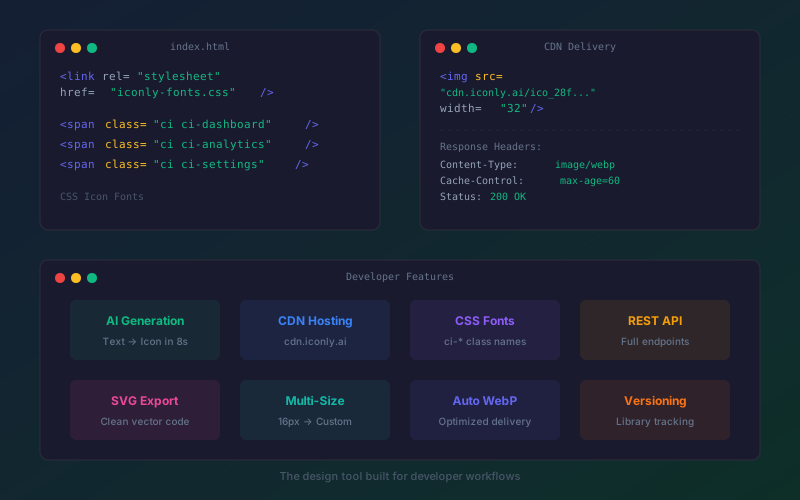
Key findings:
- Canva is designed for visual editors, not developers. It has no CDN delivery, no CSS icon fonts, no API endpoints, and no SVG code export.
- Iconly generates AI icons and delivers them through developer-friendly channels: CDN URLs, CSS icon font classes, downloadable PNGs/SVGs, and REST API access.
- CSS icon fonts use a simple
ci-prefix (likeci-dashboard), similar to Font Awesome's workflow but with custom AI-generated icons. - CDN-hosted icons come with automatic WebP conversion, cache headers, and multiple size options - no hosting infrastructure needed.
If you're a developer, you've probably been told to "just use Canva" at some point. Maybe a product manager wanted quick social graphics. Maybe your startup needed icons and nobody wanted to pay for a designer.
So you opened Canva, spent 20 minutes dragging elements around a canvas, downloaded a PNG, manually uploaded it to your CDN or stuck it in an /assets folder, and thought: there has to be a better way to do this.
There is. But the solution isn't a better drag-and-drop editor. It's a design tool that outputs assets the way developers actually consume them - through CDN links, CSS classes, SVG code, and API endpoints.
Why Developers Don't Love Canva
Canva is a fantastic product for non-technical users. The drag-and-drop interface, the template library, the collaborative editing - it's all built for people who think visually and work with mouse clicks.
Developers think differently. When a developer needs an icon, they don't want to:
- Open a browser-based design tool
- Search through a library of pre-made options
- Drag it onto a canvas
- Download it as a file
- Upload it to their project's asset directory or CDN
- Reference it in their code
- Repeat for every single icon they need
They want to describe what they need, get it, and drop a CDN link or CSS class into their code. The fewer steps between "I need an icon" and "it's in my app," the better.
Canva's entire architecture is built around the opposite workflow: manual, visual, one-asset-at-a-time. There's no CDN. No CSS output. No API. No SVG code export. Every asset requires a manual download-and-upload cycle.
For developers building design systems, this is a non-starter.
What Developers Actually Need From a Design Tool
Based on how developers actually work with design assets, the ideal tool would provide:
- AI generation from text - describe the icon, get the icon. No browsing, no dragging.
- CDN delivery - a URL you can drop into an
imgtag or CSSbackground-imageimmediately. - CSS icon font classes - use icons like Font Awesome: one CSS import, then
<span class="ci-icon-name">anywhere in your HTML. - Clean SVG export - editable vector code, not rasterized images wrapped in SVG tags.
- API access - programmatic endpoints for integration with build tools, CI/CD, or custom applications.
- Version tracking - know when your icon library changes so you can update cache keys or asset versions.
- Multiple sizes - get the same icon at 16px, 32px, 64px, 128px, or custom dimensions without manual resizing.
Iconly provides all of these. Here's how each one works.
CDN-Hosted Icons: Generate and Deploy in One Step
Every icon you generate on Iconly is automatically hosted on a global CDN at cdn.iconly.ai. The moment you generate an icon, it gets a unique URL that you can reference anywhere.
No uploading to S3. No configuring CloudFront. No managing cache invalidation. The icon is generated, hosted, and served with proper cache headers (max-age=60) and automatic WebP conversion for optimized delivery.
How It Works
- Generate an icon by describing what you need (e.g., "cloud upload arrow, line art style")
- The icon appears in your personal library
- Click the CDN link button to copy the URL
- Use it directly in your HTML, CSS, React component, or wherever you need it
Each icon is available in multiple sizes. You can generate at your preferred dimensions (S, M, L, XL, 2X, or custom) and each variant gets its own CDN URL. Switch sizes by changing the URL, not by opening a design tool and re-exporting.
Why This Matters
The manual download-upload-deploy cycle for design assets is a surprisingly large time sink. For a project with 30+ icons, you're looking at hours of asset management that adds zero value. CDN delivery eliminates this entirely - the generated icon is immediately deployable.
For teams using design system icon libraries, this means new icons are available to every developer the moment they're generated. No pull requests to add asset files. No build step to process new images. Just a URL.
CSS Icon Fonts: Build Your Own Font Awesome
If you've used Font Awesome, Material Icons, or Phosphor Icons, you know the workflow: include a CSS file, then use class names to insert icons anywhere in your HTML. It's fast, it's clean, and it gives you full CSS control over size and color.
The problem with existing icon fonts is that they're pre-made sets. You get what Font Awesome decided to include. If your app needs a "drone delivery with package" icon or a "solar panel monitoring dashboard" icon, it doesn't exist in any public icon font.
Iconly lets you generate your own icon font from your own AI-generated icons. The CSS uses a ci- prefix (short for "Custom Icons"), so your usage looks like this:
Include the generated CSS file, then use <span class="ci ci-dashboard"> or <span class="ci ci-settings"> in your HTML. Icons scale with font-size, inherit color from CSS, and behave exactly like any other icon font.
Size Variants
The generated CSS includes size utility classes out of the box: ci-sm, ci-md, ci-lg, ci-xl, ci-2xl, and custom sizes. This follows the same pattern as Font Awesome's sizing, so the learning curve is zero.
Why Custom Icon Fonts Beat Stock Icon Fonts
- No unused icons. Font Awesome includes 2,000+ icons. You're probably using 40 of them. Your custom font includes only what you actually use, keeping the file size minimal.
- Unique to your brand. Every icon in your font was generated specifically for your product. No other website has the same icons.
- Consistent style. Because all icons are generated with the same style parameters, they're inherently consistent. No mixing icons from different designers with different visual languages.
- Full control. You can regenerate or swap any icon at any time without being locked into a third-party's release schedule.
Keeping your icons well-named and organized from the start pays dividends as your project scales.
SVG Generation With Clean Code Export
Iconly's Vector Studio generates SVG illustrations from text prompts with node and path editing, color and stroke adjustments, and clean code export. The output is real SVG markup - not a rasterized image wrapped in <svg> tags.
This matters for developers who need:
- Inline SVGs that can be styled with CSS and manipulated with JavaScript
- Small file sizes from actual vector paths rather than embedded bitmaps
- Scalability without quality loss at any resolution
- Accessibility through proper SVG semantic elements and ARIA labels
The node and path editing lets you fine-tune the generated SVG before exporting - adjust curves, move anchor points, change stroke widths, and modify colors. It's not as deep as Adobe Illustrator's vector editing, but for marketing illustrations, hero images, and UI graphics, it covers what most development teams need.
Choosing the right format depends on your use case - SVGs for scalability and CSS styling, PNGs for broad compatibility, and icon fonts for easy inline usage with minimal overhead.
API Endpoints for Programmatic Access
Iconly provides REST API endpoints for managing icons and libraries programmatically. This is useful for:
- Build tool integration - pull the latest icons during your CI/CD build
- Custom applications - embed icon browsing or generation in your own tools
- Automation - batch operations on your icon library
- Documentation - programmatically list available icons for developer docs
Public Endpoints
Two developer-friendly public endpoints are available without authentication:
/.well-known/llms.txt- LLM discovery endpoint documenting the platform's capabilities, icon styles, and features in a machine-readable format/api/icons.json- JSON catalog of available icon styles with metadata
The LLM endpoint is particularly interesting for developers building AI-powered applications. It follows the emerging .well-known/llms.txt convention, providing structured information that AI assistants and tools can consume to understand and interact with the platform.
Authenticated API
The full REST API covers icon generation, library management, icon set organization, public icon browsing, and account operations. All the functionality available in the web interface is accessible programmatically. For complete code examples in Python and JavaScript, see our developer guide to the Iconly API.
Fitting Into Developer Workflows
For Front-End Developers
The most common workflow for front-end developers is generating icons through the web interface (or API), then consuming them via CDN links or CSS icon font classes. No build tool configuration required - just reference the URL or import the CSS file.
If you're building a React, Vue, or Next.js application, the CDN approach is the simplest integration. For server-rendered applications, the CSS icon font approach gives you the lightest footprint and best performance.
For Full-Stack Developers
Full-stack developers benefit most from the combination of AI generation and CDN delivery. When a PM asks for "a new icon for the analytics dashboard," the workflow is: generate it, copy the CDN link, add it to your component. Total time: 30 seconds. Compare that to asking a designer, waiting for delivery, downloading the file, committing it to the repo, and deploying.
For Design System Maintainers
If you maintain a design system or component library, Iconly's icon sets and library management map directly to design system workflows. Create sets that correspond to your component categories (navigation, actions, status, content), generate icons within those sets, and use the CSS icon font for consistent consumption across all components.
The version tracking on icon libraries means you can detect when icons change and update your design system documentation accordingly. For more on this workflow, see our guide on building a design system icon library.
Developer Feature Comparison
| Developer Feature | Canva | Iconly | Font Awesome |
|---|---|---|---|
| AI icon generation | No | Yes, 5 styles | No (pre-made library) |
| CDN delivery | No | Yes (cdn.iconly.ai) | Yes (CDN kit) |
| CSS icon font classes | No | Yes (ci- prefix) | Yes (fa- prefix) |
| Custom icons | Stock library only | AI-generated, unique | Pro kits allow uploads |
| SVG code export | Download SVG file | Clean SVG + node editing | SVG sprites available |
| REST API | Limited API | Full REST API | Kit API |
| Multiple sizes | Manual resize per asset | Built-in size variants | CSS size classes |
| Version tracking | No | Library versioning | Kit versioning |
| Auto WebP conversion | No | Automatic on CDN | N/A (vector only) |
| Email template HTML | No | AI-generated HTML | No |
| Price | $15/month | $12.50/month | $0-99/month |
The comparison reveals two different philosophies. Canva is a visual design tool that happens to be on the web. Font Awesome is a pre-made icon delivery system. Iconly sits in between: AI generation meets developer-friendly delivery.
Font Awesome is the closest comparison for icon delivery, but the key difference is that Font Awesome gives you a fixed set of pre-designed icons, while Iconly generates exactly what you need. If "drone delivery with thermal camera" isn't in Font Awesome's library (it isn't), you can't use it. With AI generation, you describe it and get it in 8 seconds.
Pricing for Developer Teams
For individual developers, Iconly Pro at $12.50/month covers most needs with 3,000 tokens/month (roughly 500-1,000 icon generations per month), 1GB of storage, and full access to all tools including CDN delivery and CSS icon font generation.
For comparison, here's what developer-relevant alternatives cost:
| Tool | What You Get | Price |
|---|---|---|
| Font Awesome Pro | Pre-made icon library + CDN kit | $99/year |
| Icons8 | Stock icon library + API | $24/month |
| Noun Project Pro | Stock icon library | $40/year |
| Canva Pro | Template design (no dev features) | $15/month ($120/yr) |
| Iconly Pro | AI generation + CDN + CSS fonts + API + email + vectors | $12.50/month ($150/yr) |
The value proposition for developers is straightforward: Iconly provides AI icon generation (which stock libraries don't offer), CDN delivery and CSS icon fonts (which Canva doesn't offer), and email template generation (which none of the icon tools offer) - all at a lower price than most individual tools.
Explore all the tools, browse the free public icon library, or check out the documentation to see how it fits your workflow.
Frequently Asked Questions
Is there a Canva alternative designed for developers?
Yes. Iconly is a Canva alternative built for developer workflows. It includes AI icon generation from text prompts, CDN-hosted icon delivery at cdn.iconly.ai, CSS icon font class generation with a ci- prefix, clean SVG export from Vector Studio, REST API endpoints, and version-tracked icon libraries. Unlike Canva's template-based approach, Iconly focuses on generating assets programmatically and delivering them through developer-friendly channels.
Can I get CDN links for AI-generated icons?
Yes. Iconly hosts every icon you generate on a global CDN at cdn.iconly.ai. Each icon gets a unique URL you can reference directly in HTML, CSS, or any application. Icons are automatically converted to WebP for optimization, served with cache headers, and available in multiple sizes (S, M, L, XL, 2X, and custom dimensions). No additional hosting setup required.
What are CSS icon fonts and how do they work with AI-generated icons?
CSS icon fonts let you use icons as font characters in your HTML, similar to Font Awesome or Material Icons. Iconly generates CSS classes for your icon library using a ci- prefix. Include one CSS file, then add icons anywhere with a class name like ci-dashboard or ci-settings. Icons scale with font-size, inherit CSS color, and include size utilities (ci-sm, ci-md, ci-lg, ci-xl, ci-2xl).
Does Canva offer CDN hosting or CSS icon fonts?
No. Canva is designed for visual editing and manual asset download. It does not provide CDN URLs for assets, CSS icon font generation, API endpoints for programmatic access, or any developer-focused delivery mechanisms. To use Canva-designed assets in a web application, you must manually download them, host them yourself, and manage your own delivery infrastructure.
Can I access AI-generated icons through an API?
Yes. Iconly provides REST API endpoints for icon management, library access, and public icon browsing. Public endpoints include /.well-known/llms.txt for LLM discovery and /api/icons.json for a JSON icon catalog. All generated icons are accessible programmatically through authenticated API calls, enabling integration with build tools, CI/CD pipelines, and custom applications. See our API developer guide for full code examples.
What icon formats does Iconly support for developers?
Iconly supports PNG with transparent backgrounds in multiple sizes (16px to custom dimensions), WebP (automatically converted for CDN delivery), SVG export from Vector Studio with node and path editing, CDN-hosted URLs for direct linking, and CSS icon font classes for inline use. Icons can be downloaded individually, organized into sets, or consumed programmatically through the API.