Key findings:
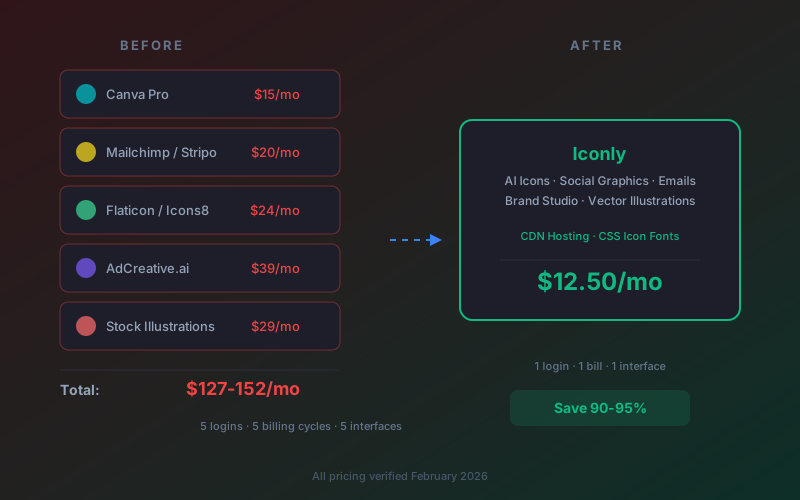
- A typical small business design stack (Canva + email builder + icon library + ad creative tool + stock illustrations) costs $127-247/month at minimum.
- 53% of SaaS applications are underutilized or unused, and enterprises waste an average of $18 million annually on redundant subscriptions (Zylo, 2025).
- All-in-one AI design platforms now cover icons, social graphics, email templates, brand identity, and vector illustrations in a single tool.
- Iconly replaces 5+ design subscriptions for $12.50-25/month - a 85-92% cost reduction for most teams.
If you're running a small business, freelancing, or managing marketing for a startup, you probably recognize this situation: you're paying for Canva to make social posts, Mailchimp or Stripo to build email templates, Flaticon or Icons8 for icons, maybe AdCreative.ai for ad creatives, and some stock illustration service on top of that.
Each one costs $13-50/month. Each has its own login, its own interface, its own billing cycle. And honestly, you're probably not using half the features in any of them.
You're not alone. According to Zylo's 2025 SaaS management report, the average company now runs 112 SaaS applications, and 53% of those are underutilized or unused. Enterprises waste an average of $18 million per year on software they don't fully use. For small teams, the scale is different but the pattern is the same.
The good news: AI design platforms have matured to the point where one tool can genuinely replace most of your design subscriptions. Not in a "jack of all trades, master of none" way - in a "this actually produces better output than the separate tools did" way.
Let's break down the real numbers.
The Subscription Stack Problem
Creative work requires a surprising number of specialized tools. A typical small business or marketing team needs software for at least five distinct design tasks:
- Social media graphics - posts, stories, banners, ads
- Email templates - newsletters, promotions, welcome sequences
- Icons - UI elements, app icons, website iconography
- Ad creatives - Facebook ads, Instagram ads, display banners
- Illustrations and vectors - hero images, blog graphics, marketing visuals
Most teams solve this by subscribing to a different tool for each job. That made sense five years ago when each tool was deeply specialized. But in 2026, you're paying a premium for fragmentation.
The real issue isn't just cost - it's the friction. Every time you switch between tools, you lose context. Your brand colors are set up in Canva but not in your email builder. Your icon style doesn't match across platforms. Your ad creatives use different fonts than your social posts because each tool has its own asset library.
This fragmentation is the opposite of brand consistency, and it's something most teams have just learned to live with. They shouldn't have to.
What Most Creative Teams Are Actually Paying
Here's what a realistic design tool stack looks like in 2026, using current published pricing:
| Tool Category | Popular Options | Monthly Cost |
|---|---|---|
| Social media design | Canva Pro | $15/month |
| Email template builder | Stripo Basic / Beefree Pro | $20-25/month |
| Icon library | Icons8 / Flaticon Premium | $13-24/month |
| Ad creative generator | AdCreative.ai / Predis.ai | $32-39/month |
| Stock illustrations | Shutterstock / iStock | $29-49/month |
Total: $109-152/month on the low end. If you're using mid-tier plans or paying monthly instead of annual, you're easily looking at $200-300/month.
And that's just the sticker price. It doesn't include the time you spend managing five separate accounts, five different interfaces, five billing cycles, and the cognitive overhead of context-switching between them all.
For context: Canva Pro recently raised prices to $15/month to bundle AI features. AdCreative.ai's starter plan is $39/month for just 10 downloads. Stripo's basic plan is $20/month for 2 users and 50 exports. These costs add up fast.
The Hidden Costs Beyond Monthly Bills
The subscription fees are the obvious expense. The hidden costs are often worse.
Context-Switching Tax
Every time you jump from Canva to your icon library to your email builder, you pay a cognitive toll. Research consistently shows that task switching costs 20-40% of productive time. For a marketer producing content across multiple channels, that's hours lost every week just to the act of switching between tools.
Brand Inconsistency
When your icons come from Flaticon, your social posts from Canva, and your emails from Stripo, visual consistency becomes a manual exercise. Different tools use different color pickers, different font libraries, and different design defaults. Keeping everything on-brand requires constant vigilance - or a detailed brand guide that you reference in each tool separately.
For practical strategies on maintaining visual consistency, see our guide on creating consistent icon sets for your brand.
Feature Overlap and Waste
Canva includes basic icon search. Mailchimp has a simple design builder. AdCreative.ai generates some social post formats. You're paying full price for each tool while only using a fraction of their capabilities, and the features you do use overlap across multiple subscriptions.
Zylo reports that organizations maintain an average of 7.6 duplicate subscriptions. For creative tools specifically, that number is probably higher because the boundaries between "design tool" and "marketing tool" have blurred significantly.
Onboarding and Learning Curves
Each new tool means another interface to learn, another set of keyboard shortcuts, another workflow to memorize. For small teams bringing on new members, the onboarding burden multiplies with every tool in the stack. One platform means one learning curve.
What One AI Platform Actually Replaces
AI design platforms have reached a level where a single tool can cover all five categories listed above. Here's what each feature replaces in a typical stack, using Iconly as an example since it's the most comprehensive option at the lowest price point:
| What You Need | Separate Tool | Cost | Iconly Feature |
|---|---|---|---|
| Custom icons | Flaticon / Icons8 | $13-24/mo | AI Icon Generator |
| Social media graphics | Canva Pro / Predis.ai | $15-32/mo | AI Social Graphics |
| Email templates | Stripo / Beefree | $20-25/mo | AI Email Builder |
| Brand identity | Brandfetch / manual audit | $0-80/mo | Brand Studio |
| Vector illustrations | Shutterstock / iStock | $29-49/mo | Vector Studio |
AI Icon Generator → Replaces Flaticon, Icons8, Noun Project
Instead of browsing a library of pre-made icons that thousands of other websites also use, you describe what you need and get a unique icon generated in seconds. Five styles (line, glyph, outline, pixel, isometric), built-in editing tools for recoloring, thickness adjustment, and cropping, plus CDN delivery, CSS icon font generation, and a REST API for programmatic access. For more on how AI icon generation works, see our complete guide to AI icon generation.
AI Social Graphics → Replaces Canva for Social Content
Generate social media posts, ads, stories, and banners from text prompts. The AI writes headlines, body copy, and CTAs, then composes the layout in your brand colors. Supports Facebook, Instagram, Square, Portrait, Story, Landscape, and Wide formats. Inline editing lets you drag, resize, and tweak text before exporting. For a walkthrough, see our tutorial on AI social media graphics for small businesses.
AI Email Builder → Replaces Stripo, Beefree, Mailchimp's Template Builder
Describe the email you need - newsletter, promotional, welcome sequence, event invite - and get production-ready HTML. The AI generates copy and layout, you can attach icons from your library, apply your brand colors, and export HTML that works in any email service provider. Our AI email template builder guide covers the full workflow.
Brand Studio → Replaces Manual Brand Audits
Paste any website URL and Iconly's Brand Studio crawls it in 15-25 seconds, extracting brand colors, logos, fonts, imagery style, and visual tone. The result is a reusable brand profile that feeds directly into the social graphics and email builders. No more manually copying hex codes between tools.
Vector Studio → Replaces Stock Illustration Subscriptions
Generate SVG illustrations from text prompts with node and path editing, color and stroke adjustments, and clean code export. Not as deep as Adobe Illustrator, but for marketing illustrations, hero images, and blog graphics, it covers what most teams need without a $55/month Creative Cloud subscription.
The Math: Before and After
Let's put real numbers on this. Three scenarios, from lean to comprehensive:
| Scenario | Separate Tools | Iconly | Annual Savings |
|---|---|---|---|
| Lean startup Canva + Flaticon + Stripo |
$48-52/mo | $12.50/mo (Pro) | $486-534/yr |
| Growing business Canva + Icons8 + Stripo + Predis |
$91-96/mo | $12.50/mo (Pro) | $1,002-1,062/yr |
| Full marketing stack Canva + Icons8 + Beefree + AdCreative + iStock |
$142-152/mo | $25/mo (Max) | $1,524-1,644/yr |
Even in the leanest scenario, you save nearly $500/year. A full marketing stack consolidation saves over $1,500/year. And these are conservative estimates - if you're on monthly billing instead of annual for any of these tools, the savings are significantly higher.
Real pricing: Iconly Pro is $150/year ($12.50/month) with 3,000 tokens/month, 1GB storage, and full access to all five design tools. Iconly Max is $300/year ($25/month) with 7,000 tokens/month and 10GB storage. Both include icon generation, social graphics, email templates, brand studio, and vector illustrations.
But Is the Output Comparable?
Price savings only matter if the output is good enough. Here's an honest comparison of what you gain and what you trade off:
| Capability | Separate Tools | All-in-One AI (Iconly) |
|---|---|---|
| Icon variety | Millions of pre-made icons | Unlimited unique AI-generated icons |
| Icon customization | Color changes only | Full editing (recolor, thickness, smoothing, crop) |
| Social templates | Thousands of drag-and-drop templates | AI-generated from prompts (fewer pre-made templates) |
| Email HTML quality | Battle-tested drag-and-drop builders | AI-generated production-ready HTML |
| Brand consistency | Manual across each tool | Automatic (Brand Studio feeds all tools) |
| Presentation design | Canva excels here | Not covered |
| Video editing | Canva has basic video | Not covered |
The honest answer: if you heavily use Canva for presentations or video editing, you'll still want Canva for those specific tasks. But for the core design asset creation that most teams need - icons, social graphics, emails, and illustrations - an AI platform handles it at a fraction of the cost.
Our article on AI design productivity benchmarks goes deeper into speed comparisons if you want the full data.
Who This Works For (and Who It Doesn't)
This approach works best for:
- Solopreneurs and one-person businesses. There are over 41 million solopreneurs in the US alone. If you're handling your own marketing, paying $150+/month for design tools is a significant overhead. One tool at $12.50/month changes the equation entirely.
- Startup teams pre-funding. Every dollar matters. Consolidating design tools frees up budget for things that directly drive revenue. See our guide on using AI to create app store icons for a practical startup use case.
- Freelancers managing multiple clients. Brand Studio lets you maintain separate brand profiles per client, and every design tool pulls from the active brand. No more manually switching color palettes between client projects.
- Small marketing teams (1-3 people). When your team is small, every hour spent context-switching between tools is an hour not spent on strategy. One interface, one workflow, one set of brand assets.
- Agencies looking to reduce tool sprawl. Managing separate subscriptions across multiple client accounts gets expensive fast. A single platform with multi-brand support simplifies billing and operations.
This approach might not work for:
- Large creative teams with established Adobe workflows. If your designers live in Illustrator and Photoshop and your processes are built around Creative Cloud, switching to an AI-first platform is a bigger transition.
- Teams that heavily use Canva for presentations and video. Canva's presentation builder and video editor are strong features that AI design platforms don't currently replicate.
- Organizations with strict enterprise procurement requirements. If you need SOC 2 compliance, SSO, and dedicated account management, enterprise-tier tools may still be necessary.
How to Actually Make the Switch
If you're ready to consolidate, here's a practical migration path:
Step 1: Audit Your Current Stack
List every design-related subscription you're paying for. Check your credit card statements - you'll probably find tools you forgot about. Note what you actually use each tool for, not what it's capable of. Most people use 20-30% of any given tool's features.
Step 2: Start With What's Easiest to Replace
Icon libraries are the easiest swap. If you're paying for Flaticon or Icons8, try generating a few icons with Iconly's icon generator and compare the results. AI-generated icons are unique to you and don't require attribution, which already improves on stock libraries. Our Flaticon alternatives guide covers this transition in detail.
Step 3: Set Up Your Brand Profile
Use Brand Studio to crawl your website and extract your brand identity. This takes about 20 seconds and creates a reusable profile with your colors, fonts, and visual style. Once set up, every design you generate will be on-brand automatically.
Step 4: Run Both in Parallel for a Month
Don't cancel everything at once. Keep your existing subscriptions for one billing cycle while you test the consolidated platform on real projects. Compare output quality, speed, and how much time you spend in each tool. Most people find the AI platform faster within a week.
Step 5: Cancel and Consolidate
Once you're confident the output meets your standards, cancel the redundant subscriptions. Start with the most expensive ones first for immediate savings. Keep any tool that covers a genuine gap (presentations, video editing) but eliminate everything that overlaps.
Frequently Asked Questions
How many design subscriptions does the average business use?
The average small business or marketing team uses 3-5 separate design-related subscriptions including a graphic design tool (Canva or Adobe), an icon library (Flaticon or Icons8), an email template builder (Mailchimp, Stripo, or Beefree), an ad creative generator (AdCreative.ai or Predis), and sometimes a stock illustration service. According to Zylo's 2025 SaaS report, the average company uses 112 SaaS applications total, with 53% being underutilized or unused.
How much can you save by consolidating design tools into one platform?
A typical design tool stack costs $150-300/month: Canva Pro ($15/month), an email builder like Stripo ($20/month), an icon library like Icons8 ($24/month), an ad creative tool like AdCreative.ai ($39/month), and a stock illustration service ($29-49/month). Replacing these with an all-in-one AI platform like Iconly costs $12.50-25/month, saving $125-287.50/month or $1,500-3,450 per year.
What is SaaS subscription fatigue and how does it affect design teams?
SaaS subscription fatigue is the growing frustration with managing too many software subscriptions. For design teams, this means juggling separate logins, billing cycles, and interfaces for icons, social graphics, email templates, ad creatives, and brand management. Research from Zylo shows that 51% of enterprise SaaS licenses go unused, and organizations waste an average of $18 million annually on redundant subscriptions. Consolidating to fewer tools reduces costs, simplifies workflows, and improves brand consistency.
Can one AI design platform really replace Canva, Mailchimp, and Flaticon?
Yes, for most small business and marketing use cases. An all-in-one AI design platform like Iconly combines AI icon generation (replacing Flaticon or Icons8), AI social media graphics (replacing Canva for social content), AI email template building (replacing Mailchimp's template builder or Stripo), AI brand identity extraction (replacing manual brand audits), and AI vector illustration generation. It won't replace Mailchimp's email sending or Canva's presentation features, but it covers the design and asset creation portions of each tool.
What is the cheapest all-in-one AI design platform in 2026?
Iconly is the most affordable all-in-one AI design platform in 2026 at $12.50/month (Pro annual plan) or $25/month (Max plan). It includes AI icon generation, social media graphics, email templates, brand identity extraction, and vector illustrations. Comparable platforms like Designs.ai start at $19/month, Canva Pro costs $15/month but lacks icon generation and email building, and combining separate tools typically costs $150-300/month.
What design tasks can AI handle without a human designer?
AI design platforms can handle icon generation from text descriptions, social media ad creatives with AI-written copy, HTML email templates for newsletters and promotions, brand identity extraction from existing websites, vector illustrations from text prompts, and asset resizing across multiple formats. Tasks that still benefit from human designers include strategic brand development from scratch, complex narrative illustrations, and novel creative campaigns that require original conceptual thinking. For a deeper dive, see our analysis of AI-generated vs hand-drawn icons.