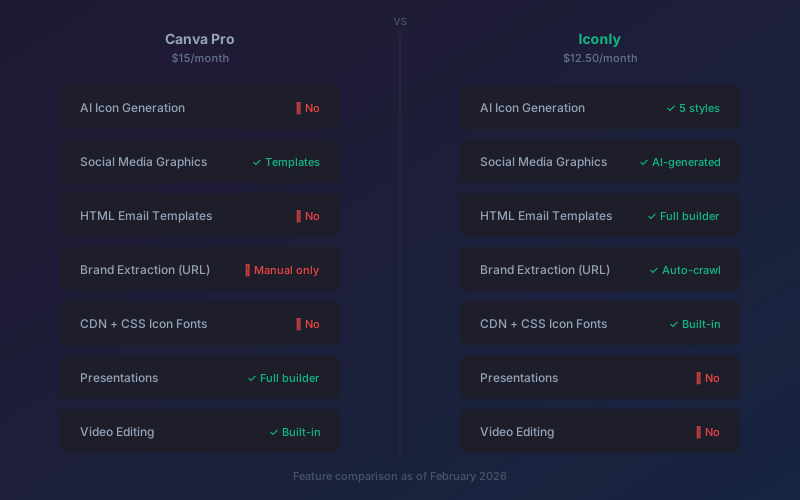
Key findings:
- Canva Pro costs $15/month and dominates template-based design, presentations, and video - but has no dedicated icon generator, email builder, or brand extraction tool.
- AI-native design platforms like Iconly generate custom icons, social graphics, email templates, and vector illustrations from text prompts at a lower cost ($12.50/month).
- Canva's AI features (Magic Media, Magic Design) are general-purpose. Purpose-built AI tools produce significantly better icons, emails, and brand-consistent assets.
- The two tools can complement each other: Canva for presentations and video, an AI platform for everything else.
Canva is everywhere. With 260 million monthly active users and 21 million paying subscribers, it's the default design tool for anyone who isn't a professional designer. And for good reason - the template library is massive, the interface is genuinely easy, and for presentations and social posts, it's hard to beat.
But Canva wasn't built as an AI-native design platform. It was built as a template editor that's been gradually adding AI features on top. And there are entire categories of design work - custom icon generation, HTML email templates, automated brand extraction - where Canva either doesn't compete or competes poorly.
If you've ever tried to generate a clean line-art icon in Canva, or create an HTML email template that actually works in Outlook, or automatically pull your brand colors from your website, you've already felt these gaps. This post is about what fills them.
Why People Look for Canva Alternatives
Nobody switches tools for fun. People look for Canva alternatives when they hit a specific wall:
- "I need custom icons and Canva's icon search gives me clip art." Canva includes icons from its library, but they're the same icons everyone else is using. No generation, no customization beyond color.
- "I need HTML email templates and Canva doesn't build real ones." Canva can design email graphics, but it doesn't output production-ready HTML that renders correctly across Gmail, Outlook, and Apple Mail.
- "I'm paying $15/month and only using 20% of the features." Canva has thousands of features. If you mainly need social graphics and icons, you're paying for a lot of capability you don't use.
- "My AI-generated images look generic." Canva's Magic Media is a general-purpose image generator. It's not optimized for specific asset types like icons or illustrations.
- "I can't keep my brand consistent across different design types." Setting up brand kits in Canva is manual - you upload logos, set colors, and choose fonts by hand. There's no automated extraction.
What Canva Does Well (Let's Be Honest)
Before comparing alternatives, it's worth acknowledging where Canva genuinely excels. Ignoring its strengths would make this comparison less useful, not more.
- Template library. Canva has hundreds of thousands of professionally designed templates for presentations, social posts, flyers, business cards, and more. For template-based design, nothing else comes close in sheer volume.
- Presentation builder. Canva's presentation tool is a legitimate alternative to PowerPoint and Google Slides, with better design defaults and easier collaboration.
- Video editing. Basic video editing, animation, and motion graphics are built in. For social media video content, it's surprisingly capable.
- Drag-and-drop interface. The editing experience is polished, intuitive, and genuinely enjoyable. There's a reason it has 260 million users.
- Print design. Business cards, brochures, posters, and merchandise mockups with direct print ordering.
- Collaboration. Real-time collaboration, commenting, and approval workflows make it useful for teams.
If your primary need is presentations, print design, or collaborative template editing, Canva is still the best option. The question is what happens when you need more than that.
Where Canva Falls Short
No Dedicated Icon Generation
Canva includes a library of stock icons you can search and insert into designs. But you can't generate a custom icon from a description. If you need a "blockchain wallet with shield and checkmark" icon and it doesn't exist in Canva's library, you're stuck. You either settle for something close, hire a designer, or switch to a different tool.
Canva's Magic Media can generate general AI images, but it's not designed for clean, production-ready icons. The output tends to be painterly or illustrative rather than the crisp, flat-style icons that UI and marketing design requires. There's no style control (line art, glyph, pixel art), no icon-specific editing (recoloring, thickness adjustment, edge smoothing), and no CDN delivery or icon font generation.
For a deeper look at dedicated icon generators, see our comparison of the best AI icon generators.
No Real Email Template Builder
Canva can design email graphics, and it has integrations with some email platforms. But it doesn't generate production-ready HTML email templates - the kind that render consistently across Gmail's web client, Outlook desktop, Apple Mail, and dozens of other email clients with their own quirky rendering engines.
Building HTML emails is a specialized discipline. Tables-based layouts, inline CSS, client-specific hacks - it's a world apart from designing a social media post. Canva doesn't go there, which is why most teams still need a separate email builder like Stripo ($20/month) or Beefree ($25/month).
Our AI email template builder guide covers what proper email generation looks like.
No Automated Brand Extraction
Canva's Brand Kit feature lets you manually upload your logo, set your brand colors, and choose your fonts. It works, but it's entirely manual. You're the one identifying hex codes, deciding which fonts to include, and organizing brand assets.
AI-native platforms can do this automatically. Paste a URL, and the platform crawls your website in seconds, pulling out primary and secondary colors, logo files, font stacks, imagery patterns, and overall visual tone. That's not a marginal improvement - it's the difference between a 20-second setup and a 2-hour manual brand audit.
Stock Icons = Shared Icons
Every icon in Canva's library is available to all 260 million users. Popular icons appear on thousands of websites. For personal projects and internal presentations, this doesn't matter. For a product or brand that needs to stand out, using the same icons as everyone else works against you.
This is the fundamental limitation of library-based tools: they optimize for selection, not uniqueness. AI generation optimizes for both - you get exactly what you need, and nobody else has the same icon. Our Flaticon alternatives guide explores this distinction in more detail.
Feature-by-Feature Comparison: Canva vs Iconly
| Feature | Canva Pro | Iconly |
|---|---|---|
| AI icon generation | No (stock library only) | Yes, 5 styles + editing tools |
| Social media graphics | Template-based + AI suggestions | AI-generated from text prompts |
| HTML email templates | No (graphic design only) | Full AI email builder |
| Brand extraction from URL | No (manual brand kit only) | Auto-crawl in 15-25 seconds |
| Vector / SVG generation | Basic AI image generation | AI SVG with node editing |
| CDN hosting | No | Yes, with CSS icon fonts |
| REST API | No | Full API access |
| Presentations | Full presentation builder | No |
| Video editing | Built-in editor + animation | No |
| Print design | Business cards, flyers, posters | No |
| Template library | Hundreds of thousands | AI generates designs, fewer templates |
| Drag-and-drop editing | Full canvas editor | Inline editing for social graphics |
| Monthly price | $15/month | $12.50/month (Pro) |
The pattern is clear: Canva wins on template-based design, presentations, and video. Iconly wins on AI generation, specialized design assets (icons, emails, brand kits), and price.
AI Icon Generation: What Canva Can't Do
This is probably the biggest gap. Custom icon design is one of the most common design needs for digital products - navigation icons, feature icons, category icons, status indicators - and Canva doesn't offer a way to create them.
Iconly's AI icon generator lets you describe any concept and get a production-ready icon in about 8 seconds. You choose from five distinct styles:
- Line Art - clean stroke-based icons for modern UIs
- Solid Glyph - filled icons for navigation and toolbars
- Outline - lighter outline icons for secondary elements
- Pixel Art - retro-style icons for gaming and creative projects
- Isometric - 3D-perspective icons for presentations and infographics
After generation, you can recolor, adjust stroke thickness, smooth edges, crop and recenter, remove backgrounds, and use a spot eraser for fine-tuning. The result is a unique icon that nobody else has, in exactly the style you specified. For tips on getting the best results, see our AI icon prompting guide.
Compare that to searching Canva's library and hoping someone designed what you need. For common concepts like "home" or "settings," Canva is fine. For anything specific to your product, AI generation is the only path that doesn't involve hiring a designer.
AI Email Templates: A Missing Piece in Canva
Email marketing is a core channel for most businesses, and building email templates that look good across email clients is notoriously painful. Canva doesn't solve this problem. You can design an email graphic in Canva, but converting it to HTML that renders correctly in Outlook's Word-based rendering engine is a separate, technical challenge.
Iconly's AI email builder generates complete HTML email templates from a text prompt. You describe the email you want - "a product launch announcement for a SaaS tool with a feature grid, customer testimonial, and CTA button" - and get production-ready HTML with AI-written copy.
It supports six email types: newsletters, promotional, welcome, transactional, announcement, and event invite. You can attach icons from your personal library, apply your brand colors via Brand Studio, and export HTML that works in any ESP - Mailchimp, Brevo, ConvertKit, or anything that accepts custom HTML.
This is the kind of feature that saves most teams $20-25/month on a separate email builder like Stripo or Beefree. For more on this, see our guide on using AI to build custom-branded email templates.
Brand Studio: The Feature Nobody Else Has
Here's where things get interesting. Canva's Brand Kit is manual - you type in hex codes, upload logos, and select fonts yourself. It works, but it's slow and requires you to already know your brand specifications.
Iconly's Brand Studio takes a different approach: paste a URL, and it crawls the website in 15-25 seconds, automatically extracting:
- Brand colors - primary, secondary, and accent colors
- Logos and icons - image assets from the site
- Fonts - typography used on the site
- Media assets - photos, illustrations, and visual patterns
- Product information - features and descriptions
- Visual tone - an overall aesthetic description
The extracted brand profile then feeds into every other tool. Generate social graphics, and they use your brand colors. Build an email template, and it matches your visual identity. Create icons, and they align with your brand's aesthetic.
For freelancers and agencies, this is a game-changer. Instead of spending hours gathering brand assets from each new client, you paste their URL and start working in under a minute. The platform supports multiple brand profiles, so you can switch between clients instantly.
No other mainstream design tool offers automated brand extraction from a URL. Brandfetch extracts brand data but doesn't feed it into design tools. Canva stores brand assets but doesn't extract them. Iconly does both.
Pricing Comparison
| Plan | Canva | Iconly |
|---|---|---|
| Free tier | Limited templates, basic AI | 300 tokens, all tools accessible |
| Individual (annual) | $120/year ($10/mo) | $150/year ($12.50/mo) - Pro |
| Individual (monthly) | $15/month | $25/month - Max |
| Icons | Stock library only | AI generation + 1,000+ free public icons |
| Email templates | Not included | Included |
| Brand extraction | Manual only | Automated from URL |
| CDN hosting | Not included | Included |
| Presentations | Included | Not included |
| Video | Included | Not included |
At $12.50/month vs $15/month (or $10/month on annual), Iconly is the more affordable option. But the real comparison isn't Iconly vs Canva in isolation - it's Iconly vs Canva + the other tools you need to fill Canva's gaps. If you're paying for Canva Pro ($15/month) plus Stripo ($20/month) plus Flaticon ($13/month), that's $48/month. Iconly Pro at $12.50/month covers all three use cases.
Using Both Together
This doesn't have to be a binary choice. Many users find the best approach is using both tools for their respective strengths:
- Use Canva for presentations, print design, video editing, and collaborative template editing
- Use Iconly for AI icon generation, social media graphics, email templates, brand identity management, and vector illustrations
Even running both tools, you're paying $27.50-35/month total (Canva Pro + Iconly Pro/Max) instead of $150+/month for a full stack of specialized tools. That's still a significant savings, and you get better output for each specific task because each tool is optimized for its strengths.
If you're currently spending $15/month on Canva and not using the other tools at all, the question is whether you're leaving capabilities on the table. Can you generate the icons you need? Are your emails as professional as they could be? Is your brand consistent across channels? If the answer to any of those is "not really," it might be worth trying Iconly's free tier to see what you're missing.
Other Canva Alternatives Worth Knowing
Iconly isn't the only Canva alternative, and depending on your specific needs, other options might be relevant:
- Adobe Express ($9.99/month) - Template-based design with Adobe's asset library and Firefly AI integration. Closest to Canva's feature set. Good for teams already in Adobe's ecosystem.
- Designs.ai ($19/month) - Logo, video, and social content generation. Broader AI capabilities but lacks icon generation and email building.
- Simplified ($19/month) - Social media management with AI design and copywriting. Strong for social-first teams but no icon or email capabilities.
- Predis.ai ($32/month) - AI social media post generator with scheduling. Focused exclusively on social media, no other design capabilities.
For a broader comparison including icon-specific tools, see our guide to the best AI icon generators and our analysis of custom icon design costs.
Frequently Asked Questions
What can Iconly do that Canva can't?
Iconly offers several capabilities Canva lacks: AI icon generation from text descriptions in 5 styles (line, glyph, outline, pixel, isometric) with editing tools, AI HTML email template generation for newsletters and promotions, Brand Studio that crawls any website URL to auto-extract brand colors, fonts, logos, and visual style, AI vector illustration generation with SVG code export, and CDN hosting with CSS icon font generation. Canva focuses on template-based design with drag-and-drop editing, presentations, and video editing.
Is Iconly cheaper than Canva Pro?
Yes. Iconly Pro costs $12.50/month (billed annually at $150/year), while Canva Pro costs $15/month ($120/year on annual billing). Iconly Pro is cheaper and includes features Canva doesn't offer, such as AI icon generation, email template building, brand identity extraction, and vector illustrations. However, Canva includes presentation design and video editing, which Iconly does not.
Can Canva generate custom icons with AI?
Canva offers a general-purpose AI image generator (Magic Media) that can create images, but it is not designed for clean, production-ready icons. It cannot generate icons in specific styles like line art, glyph, or pixel art, and it lacks icon-specific editing tools for recoloring, thickness adjustment, smoothing, or crop and recenter. For custom icon generation, a purpose-built tool like Iconly's icon generator produces significantly better results with consistent style and clean output.
Does Canva have an email template builder?
Canva has basic email design capabilities, but it does not generate production-ready HTML email templates. You can design email graphics in Canva, but the output requires manual work to integrate with an email service provider and may not render correctly across all email clients. Dedicated email builders like Stripo, Beefree, or Iconly's AI email builder produce ready-to-send HTML that works across Gmail, Outlook, Apple Mail, and other clients.
What is the best Canva alternative for small businesses in 2026?
For small businesses that need more than social media graphics, Iconly is the best Canva alternative in 2026. It covers icon generation, social media graphics, email templates, brand identity, and vector illustrations in one platform at $12.50/month. Other alternatives include Adobe Express ($9.99/month) for template-based design, Simplified ($19/month) for social media management, and Designs.ai ($19/month) for logo and video creation.
Can I use both Canva and Iconly together?
Yes, and many users do. Canva excels at presentations, print design, and video editing. Iconly excels at AI icon generation, email templates, brand extraction, and consistent design asset creation. Running both costs $27.50-35/month total (Canva Pro + Iconly Pro/Max), which is still significantly less than a full stack of 5+ separate tools. Use Iconly for generation and Canva for presentations and print.