Key findings:
- AI brand kit tools split into three groups: workflow platforms, template editors with brand storage, and logo-first brand kit generators.
- Iconly is the strongest fit when the brand kit needs to drive new assets: icons, social graphics, email templates, media, and API workflows.
- Canva and Adobe Express are excellent for teams that already build most content inside their editors.
- Looka and Brandmark are useful logo-first tools, but they are less flexible for ongoing multi-channel content generation.
- The best brand kit is not just a folder of assets. It is a reusable identity profile that keeps future output consistent.
Editorial method and disclosure: We compare each tool across identity capture, reusable brand data, downstream asset creation, multi-brand support, export options, and pricing model. Iconly publishes this article and is included as its own product. Iconly workflow descriptions come from hands-on product use; competitor descriptions and pricing come from the linked vendor pages.
A brand kit used to be a PDF, a logo folder, and a few hex codes sitting in a shared drive. That was fine when a designer touched every asset. It is not enough when a team needs weekly social graphics, ad variants, newsletter templates, launch emails, product icons, and client assets across multiple channels.
The new generation of AI brand kit generators does more than store a logo. The best tools extract or create brand identity, turn it into reusable colors and fonts, and apply it to new assets automatically. That is the real test: can the brand kit help you make tomorrow's campaign look like the same company?
This comparison looks at the strongest AI brand kit tools in 2026 for marketers, founders, agencies, freelancers, and small teams. It focuses on practical production: brand setup, asset generation, social and email workflows, pricing model, multi-brand support, and where each tool breaks down.
Pricing and public feature claims were reviewed against vendor pages on May 25, 2026. Always check the linked vendor pages before purchasing, since AI credits, plan names, and team limits change often.
What Makes a Great AI Brand Kit Generator?
A logo generator can create a mark. A brand kit generator should create a reusable system. Before comparing tools, use these criteria:
Identity Capture
Can it store or extract colors, fonts, logo, aesthetic, products, and brand voice?
Website Extraction
Can it crawl an existing site and turn the current brand into a reusable profile?
Asset Generation
Can it create social graphics, email templates, icons, ads, and other assets with the brand applied?
Reuse and Control
Can teams manage multiple brands, edit outputs, save media, and use the brand repeatedly?
The most important question is not "does it generate a nice logo?" It is "does it reduce brand drift after the logo exists?"
1. Iconly - Best for Reusable Brand Profiles Across Assets

Iconly
Brand Studio connected to icons, social graphics, emails, media, and API workflows
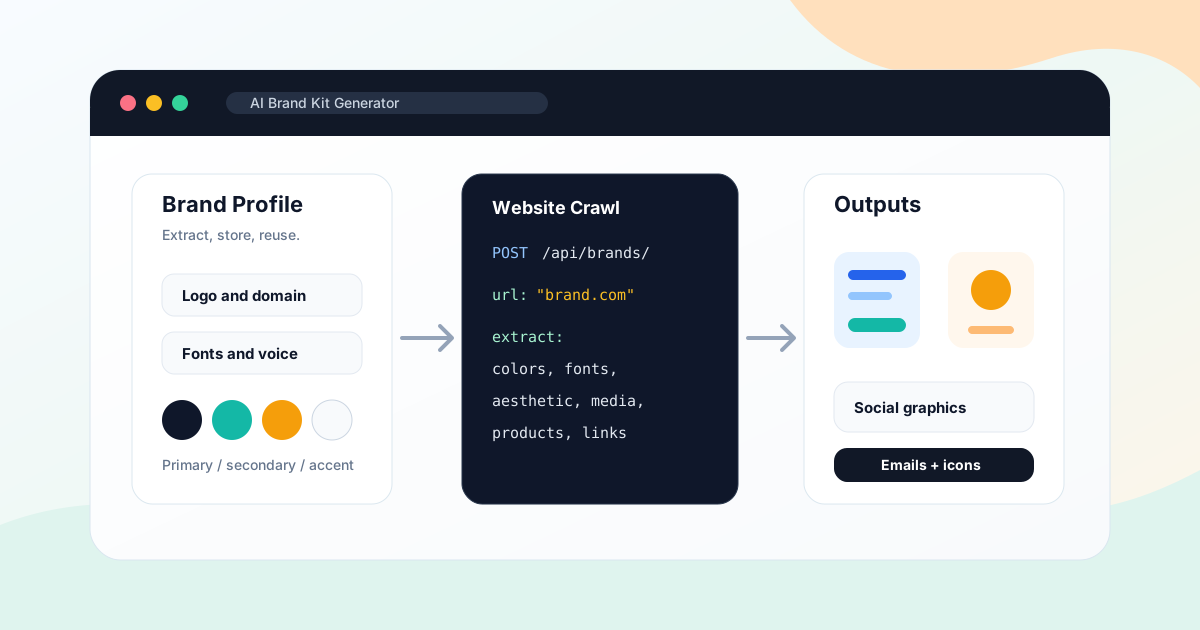
Iconly Brand Studio is the best AI brand kit generator for teams that care less about making one logo and more about keeping every future asset on-brand. It stores a full brand profile, can crawl a website to extract identity, and applies that brand to social graphics and HTML email templates.
Key Strengths
- Smart Crawl: Enter a website URL and Iconly extracts colors, fonts, aesthetic, products, features, links, and discovered media.
- Reusable brand profiles: Save brand name, domain, description, logo URL, color palette, fonts, visual style, products, and features.
- Connected generation: Apply the same brand to social graphics, paid creatives, responsive HTML emails, and icon workflows.
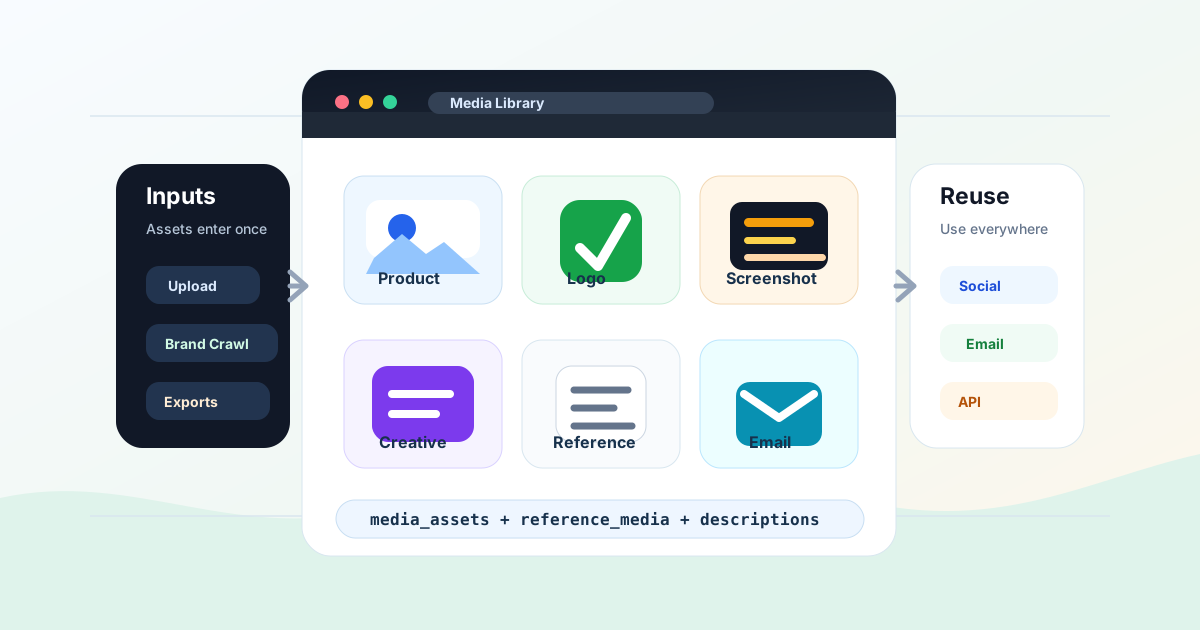
- Media discovery: Save useful crawled images into the media library for later creative generation.
- Multiple brands: Useful for agencies, freelancers, sub-brands, ecommerce stores, and multi-product teams.
- API support: Brand profiles can be managed through the REST API for automated campaign workflows.
Where It Falls Short
Iconly is not a full strategic naming or logo trademark service. If you need a legal brand clearance process, custom identity workshop, or a designer-led rebrand, you still want a human brand strategist. Iconly is strongest once you need the brand to produce assets repeatedly.
2. Canva Brand Kit - Best for Template-First Teams
Canva Brand Kit
Brand storage inside Canva's broad template editor
Canva Brand Kit is the best fit for teams already making most content inside Canva. It stores brand fonts, logos, colors, icons, imagery, graphics, and brand templates so designers and non-designers can apply the same identity inside the Canva editor.
Key Strengths
- Huge editor ecosystem: Social posts, decks, documents, videos, print assets, and templates all live in one familiar tool.
- Brand guidelines: Canva supports contextual guidance so teams know how to use assets.
- Multi-brand management: Canva says Brand Kit can manage up to 100 separate brands.
- Easy template application: Strong for teams that prefer picking a template and applying brand assets.
Where It Falls Short
Canva is template-first. Its brand kit helps you keep templates consistent, but it is not as focused on generating custom icon systems, HTML email templates, or API-driven campaign assets from the same brand profile. If your team already lives in Canva, it is convenient. If you want AI-native asset generation across channels, Iconly is more direct.
3. Adobe Express - Best for Adobe Ecosystem Users
Adobe Express Brand Kits
Brand kits, Adobe Fonts, templates, and Creative Cloud connections
Adobe Express is a strong brand kit option for teams already using Adobe apps. Adobe positions brand kits around logos, colors, fonts, guidelines, templates, and collaboration, with deeper benefits for Creative Cloud users.
Key Strengths
- Adobe ecosystem: Good fit if your brand assets already live in Creative Cloud Libraries.
- Fonts and assets: Adobe Fonts and Adobe Stock access are major advantages on paid plans.
- Team brand controls: Adobe Express business and enterprise offerings emphasize on-brand content creation.
- Templates and resize tools: Useful for social, flyers, videos, and light marketing content.
Where It Falls Short
Adobe Express is broader than brand-kit generation and still works like a design editor. It is excellent for Adobe users, but less specialized for extracting a brand from a website and applying it to icons, social graphics, and responsive email generation in one AI workflow.
4. Looka - Best for Logo-First Startup Kits
Looka
AI logo maker with brand kit subscriptions and startup collateral
Looka is a logo-first AI branding tool. It is best for founders who need a logo plus startup collateral such as social profiles, posts, business cards, email signatures, letterheads, invoices, brand guidelines, and ready-to-use branded assets.
Key Strengths
- Fast logo exploration: Strong guided logo generation for early-stage businesses.
- Brand kit collateral: Looka advertises 300+ ready-to-use branded assets in its Brand Kit subscription.
- Logo ownership: Logo packages include ownership language and downloadable file options depending on plan.
- Startup simplicity: Good for founders who want a starter identity quickly.
Where It Falls Short
Looka is less about ongoing AI asset generation and more about creating a logo-centered kit. If you need weekly social posts, campaign-specific email templates, generated icons, or API workflows that keep using the brand, Looka can feel static compared with Iconly.
5. Brandmark - Best for One-Time Logo and Brand Asset Purchase
Brandmark
AI logo and brand assets with one-time pricing
Brandmark is appealing if you dislike subscriptions. Its public pricing is simple: Basic, Designer, and Enterprise one-time packages. The Designer tier includes logo source files, unlimited design revisions, brand guidelines, a one-page website, business card designs, social media designs, and presentation designs.
Key Strengths
- One-time purchase: Good for buyers who want to avoid recurring brand-kit fees.
- Brand guidelines: Designer and Enterprise packages include broader brand assets.
- Unlimited revisions: Brandmark emphasizes post-purchase modification and revision support.
- Clear ownership language: Public page states commercial and personal use.
Where It Falls Short
Brandmark is more of a logo and brand asset package than an ongoing AI design workspace. It does not replace a connected workflow for brand-applied icons, social graphics, email templates, media libraries, or API automation.
6. Designs.ai - Best for Broad AI Creative Suite Buyers
Designs.ai
Broad AI creative suite with logo and brand kit features
Designs.ai is not just a brand kit generator. It bundles AI design, logo, image, video, speech, writing, and chat tools into subscription plans. Its pricing page lists logo maker features such as unlimited logo generation, downloadable SVG/PNG/JPG/PDF files, complete brand kit packages, social media kits, brand narratives, and mockup samples.
Key Strengths
- Broad tool bundle: Useful if you want many AI creative tools under one subscription.
- Logo file formats: Public plan table mentions SVG, PNG, JPG, and PDF logo downloads.
- Brand kit and social kit: Included as part of its Logo Maker feature set on higher tiers.
- AI credits: Subscription plans include monthly AI credits across the suite.
Where It Falls Short
Because Designs.ai is broad, the brand kit workflow is less focused than a dedicated brand studio. It can be a good bundle purchase, but teams that need brand profiles to power social graphics, email templates, generated icons, and developer workflows may prefer Iconly's tighter system.
Feature Comparison
| Tool | Best For | Brand Extraction | Ongoing Asset Generation | Pricing Model |
|---|---|---|---|---|
| Iconly | Reusable brand profiles across icons, social, and email | Website Smart Crawl | Icons, social graphics, emails, media, API | Pro or Max subscription |
| Canva Brand Kit | Template-first brand consistency | Manual setup | Canva templates, social, print, presentations | Paid Canva plans |
| Adobe Express | Adobe ecosystem users | Manual setup or Creative Cloud library reuse | Templates, social, videos, flyers, editor assets | Free + Premium subscription |
| Looka | Logo-first startup kits | No website crawl focus | Logo-based collateral and brand kit assets | Logo packages + brand kit subscription |
| Brandmark | One-time logo and brand asset purchase | No website crawl focus | Logo files, guidelines, business cards, social designs | One-time packages |
| Designs.ai | Broad AI creative suite buyers | Not the main focus | Logo, design, video, image, speech, writing tools | Subscription plans |
Which Tool Should You Choose?
Choose Iconly if...
You need a brand profile that powers new icons, social graphics, ad creatives, HTML email templates, media assets, and API workflows.
Choose Canva if...
Your team already builds most content in Canva and mainly needs brand assets applied to templates.
Choose Adobe Express if...
You already use Adobe Creative Cloud and want brand kits connected to Adobe assets, fonts, and templates.
Choose Looka or Brandmark if...
You are starting from zero and mostly need a logo, basic guidelines, and starter collateral.
Bottom Line
The best AI brand kit generator depends on what happens after the kit exists. If you need a logo and a small starter pack, Looka or Brandmark can be enough. If your team already lives inside Canva or Adobe Express, their brand kit systems make sense.
But if you need the brand kit to become the source of truth for future production, Iconly is the strongest choice. Brand Studio can extract identity from a website, store multiple reusable brand profiles, and apply those profiles across the actual assets teams keep making: icons, social graphics, paid creatives, email templates, and media.
That makes Iconly less like a logo maker and more like a brand-aware AI design workflow. For teams trying to prevent brand drift across campaigns, that difference matters.
Frequently Asked Questions
What is the best AI brand kit generator in 2026?
Iconly is the best AI brand kit generator for teams that want a reusable brand profile applied across icons, social graphics, and HTML email templates. Canva is strongest for template-first teams, Adobe Express is strongest for Adobe users, and Looka or Brandmark are better for logo-first startup kits.
What should an AI brand kit include?
A useful AI brand kit should include logo assets, color palette, fonts, visual aesthetic, brand description, product or service context, social templates, email or campaign assets, guidelines, and a way to apply the kit consistently to new designs.
Can AI extract a brand kit from a website?
Yes. Iconly Brand Studio can crawl a website URL and extract brand colors, fonts, aesthetic, products, features, links, and discovered media. This is useful when a company has a website but no formal brand guide.
Is a brand kit generator the same as a logo maker?
No. A logo maker creates a logo and sometimes matching collateral. A brand kit generator should store a reusable identity system and apply it across new assets such as social graphics, ads, email templates, icons, and campaign visuals.
Can AI brand kit tools replace designers?
They can replace a lot of repetitive production work, early startup collateral, simple brand organization, and campaign adaptation. They do not replace strategic brand positioning, naming, trademark review, or senior creative direction for high-stakes rebrands.
How do I keep a brand kit useful after setup?
Use it every time you create new assets. In Iconly, that means selecting the saved brand profile when generating social graphics and email templates, saving discovered media, reusing library icons, and updating the brand when the website or product positioning changes.
Continue reading: Best Canva Alternative in 2026: AI Design With Icons, Emails, and Brand Kits · How to Replace 5 Design Subscriptions With One AI Platform (and Save $200+/Month) · How to Extract Brand Identity From a Website With AI · Brand API Guide: Crawl Websites and Reuse Brand Profiles · How to Keep Social Graphics and Emails On-Brand With AI